GoHighLevel end-to-end integration

External design.
Real CRM operations.

Luma Home Care began as a custom-coded local-service funnel. I connected that external frontend to GoHighLevel so the same experience can capture structured lead data, create and protect opportunities, book consultations, send notifications, and manage appointment follow-up.
8Contact custom fields
2Published workflows
5Pipeline stages
2Live GHL embeds
Luma Home Care external landing page displaying the embedded GoHighLevel estimate survey
Custom frontend + GHL backendThe page keeps its own visual system while GoHighLevel handles the operational journey.
Project framing

The goal was not merely to embed a form.

The build had to preserve a polished external experience while proving that I can structure the CRM layer behind it: data mapping, pipeline logic, duplicate-safe routing, calendar behavior, notifications, and tested fallback paths.

Challenge

Turn a fictional frontend showcase into a working technical demo without rebuilding the page inside GHL or sacrificing its custom visual and interaction design.

Solution

Embed a live GHL survey and calendar inside branded modals, then connect them to custom fields, tags, a service pipeline, two workflows, internal alerts, customer emails, and an appointment reminder.

Design & frontendResponsive landing page, estimator, modal UX, disclosures, and local-service conversion flow.
CRM architectureField mapping, pipeline stages, tags, contact records, opportunity handling, and calendar configuration.
Automation & QAWorkflow branching, duplicate protection, reverse-order testing, execution-log review, and email validation.
System architecture

One customer journey across two platforms.

The browser-facing page remains externally hosted. GoHighLevel receives the visitor data and controls the operational state behind the experience.

01 · FrontendCustom Luma landing pageHTML, CSS, JavaScript
02 · IntakeEmbedded GHL surveyMulti-step structured capture
03 · CRMContact + 8 custom fieldsTags and source history
04 · AutomationEstimate intake workflowFind or create opportunity
05 · PipelineService opportunityStage-aware lead tracking
06 · BookingEmbedded GHL calendar30-minute consultation
07 · Follow-upAppointment workflowConfirmations and reminder
Automation logic

Built for the normal path—and the messy path.

The workflows were designed around real visitor behavior. A person may submit the estimate first, book directly first, revisit later, or already have an opportunity in a later stage.

1

New Estimate Intake

Triggered by the Luma survey submission.

  1. Add the demo-luma-lead tag.
  2. Search the Luma service pipeline for an existing opportunity.
  3. Create a new opportunity at New Estimate only when none exists.
  4. Preserve later-stage opportunities instead of moving them backward.
  5. Send an internal notification and customer estimate confirmation.
2

Appointment Management

Triggered by a booked Luma consultation.

  1. Add the appointment-booked tag.
  2. Find the existing Luma opportunity.
  3. Move it to Appointment Booked, or create one there when missing.
  4. Send internal and customer booking confirmations.
  5. Wait until one day before the appointment and send the reminder.
Static implementation evidence

The setup remains documented even when the account is unavailable.

These screenshots are stored with the case-study files. The live widgets depend on GHL access, but the design decisions, configuration, automation logic, and successful test evidence remain viewable here.

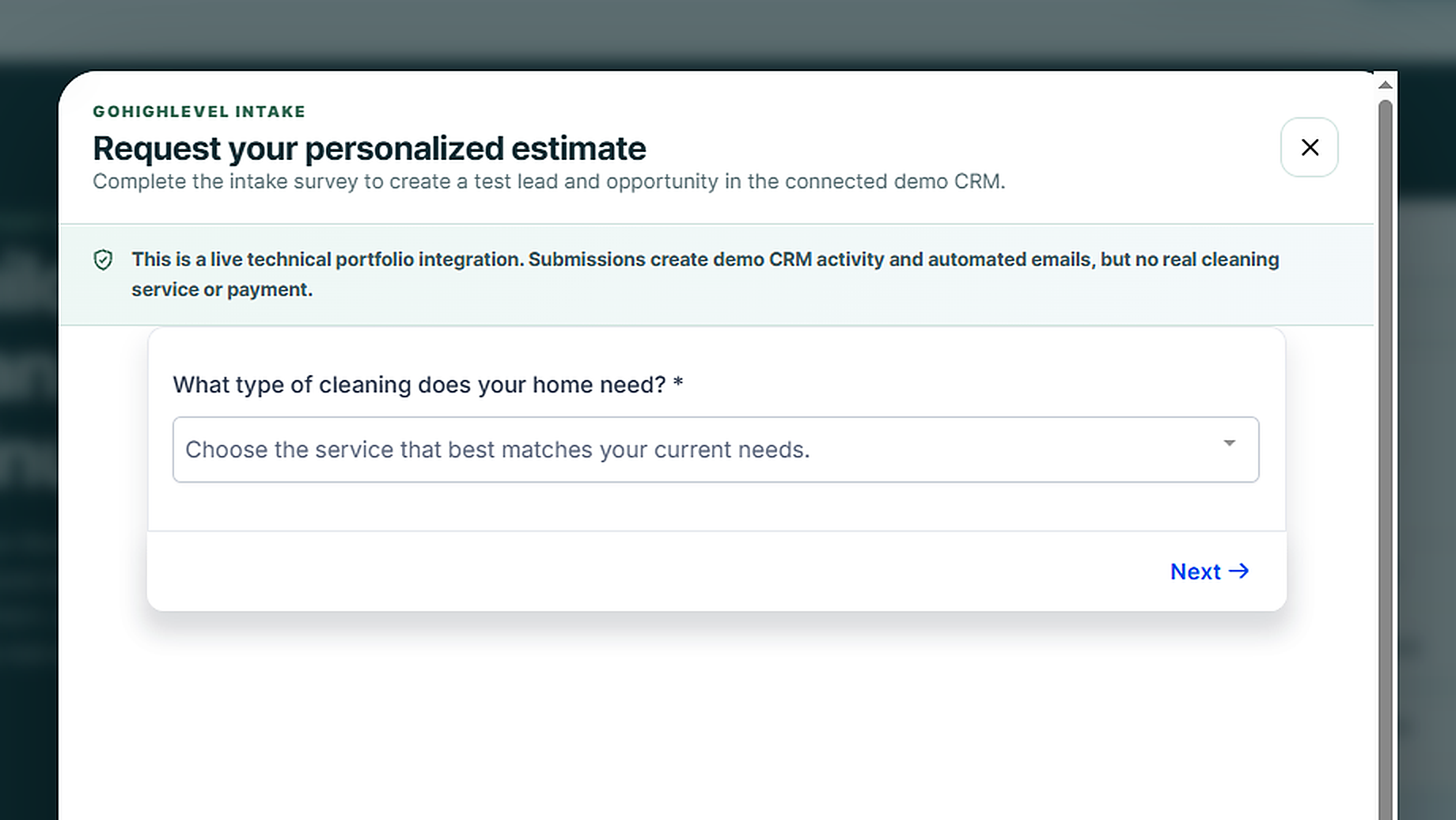
External survey integrationThe live GHL intake appears inside a branded modal without replacing the custom frontend.
External calendar integrationConsultation availability and booking stay inside the same Luma experience.
Published workflow setSeparate intake and appointment workflows keep the logic easier to maintain and explain.
Estimate intake workflowBranching protects an existing later-stage opportunity and only creates a record when necessary.
Appointment workflowBooking moves or creates the opportunity, then manages confirmation and reminder timing.
Structured contact dataService, home size, frequency, add-ons, visit date, arrival window, ZIP code, and access notes.
Multi-step surveyCustomer inputs map directly to CRM fields instead of living only in the browser.
Calendar booking formA dedicated form controls the contact information collected during scheduling.
Active consultation calendarThe 30-minute booking resource is separated and named for the demo.
Pipeline state proofTest opportunities demonstrate the estimate and booked-appointment stages in the same service pipeline.
Survey-first executionTagging, opportunity handling, notification, and customer email completed successfully.
Appointment executionThe opportunity moved successfully and the contact entered the scheduled reminder wait.
QA scenarios

Validated against multiple entry orders.

The goal was not simply to see green workflow steps. The test plan checked whether the system kept the correct CRM state when visitors entered the journey differently.

Passed

Survey → booking

The survey creates a New Estimate opportunity. Booking later finds the same opportunity and moves it to Appointment Booked.

Passed

Booking → survey

Direct booking creates or places the opportunity at Appointment Booked. A later survey does not move it backward.

Passed

Duplicate-safe routing

The workflows search before creating, reducing duplicate opportunities while still allowing genuine multiple appointments.

Saved build reference

A portable record of the implementation.

This section preserves the key names, IDs, fields, and stages needed to understand or recreate the setup. A matching JSON manifest and README are included in the downloadable folder.

Embeds & named resources

Live demo/demos/luma-home-care/
SurveyDEMO | Luma | Estimate & Visit Survey
Survey IDkGMrOpqDhsd2glRFSdKl
CalendarDEMO | Luma | Cleaning Consultation
Calendar IDqEsvWKLhdkxU8S8HfdUP
Booking formDEMO | Luma | Calendar Booking Form

Contact custom fields

DropdownLuma – Service Type
DropdownLuma – Home Size
DropdownLuma – Cleaning Frequency
CheckboxLuma – Add-ons
Date pickerLuma – Preferred Visit Date
DropdownLuma – Arrival Window
Single lineLuma – ZIP Code
Multi lineLuma – Access or Priority Notes

Service pipeline

PipelineDEMO | Luma | Service Pipeline
Stage 1New Estimate
Stage 2Estimate Reviewed
Stage 3Booking Pending
Stage 4Appointment Booked
Stage 5Quote Sent

Workflow inventory

Workflow 1DEMO | Luma | New Estimate Intake
Workflow 2DEMO | Luma | Appointment Management
Lead tagdemo-luma-lead
Booked tagdemo-luma-appointment-booked
Scheduled stepWait until 1 day before appointment
Availability note: this case-study page, its screenshots, README, and JSON manifest are static and remain available independently. If the GHL sub-account is suspended, the live survey and calendar may stop loading, but the implementation record is preserved.
Truthful portfolio boundary

A working technical demo—not a real cleaning company.

Luma Home Care, its services, pricing, testimonials, and customer records are fictional. The CRM actions shown are real test activity created specifically to validate the integration.

No payment collectionNo payment provider is connected to this demo.
No real service fulfillmentAppointments are test consultations and do not schedule cleaning work.
No invented performance claimsThe case study documents functionality and QA—not conversion or revenue results.